
WordPress maintenance
Outsource WordPress maintenance, hosting included
You want to outsource the WordPress maintenance of your site and not have to think about it again. I take care of that, with hosting included. If an update through my own management system fails, it's rolled back automatically, and recovery costs you nothing extra.
From €39 per month excl. VAT
- Hosting included
- Cancel monthly
- You message me, not a helpdesk
- Server
- my own server in the Netherlands
- Updates
- a copy before an update, a check afterward
- Backups
- daily; 14 days, then weekly and monthly
Who this is for
You're a freelancer or small business owner with a WordPress site for your practice, shop, agency, or one-person business. If one of these situations sounds familiar, this is for you:
You keep putting off updates, because last time your contact form stopped working afterward.
How I handle it
After every update through my own management system, I check that your most important pages still load. If not, the copy goes back automatically.
Your host gives you a ticket number instead of an answer.
How I handle it
You message me. I'm your host and your maintainer, so you won't get passed around.
The person who built your site doesn't really have time for maintenance anymore.
How I handle it
I take over that work. You hear from me when I need something from you, like a license that needs renewing.
Did something just go wrong after an update? Read what you can do yourself right now.
It's not for you if you're mainly looking for someone to edit your text and pages. It's also not for you if you want to stay with your current host, because hosting is part of the package. And if your site doesn't run on WordPress, I can't help you with this.
Wondering whether you could do it yourself? Read when maintaining WordPress yourself is fine.
What every package includes
Hosting
- Hosting on my own server in the Netherlands, with a secure connection (SSL) and email on your own domain. Only need email?
- Daily backups, going back up to six months, from which I can also restore individual files.
- Caching on the server (AccelerateWP), so your pages load fast.
- Access to your hosting account (cPanel), if you want to take a look yourself.
Updates
- Updates of WordPress, plugins, and themes, with a copy beforehand and a check afterward, rolled back automatically if something goes wrong.
- A three-day wait on new versions. Security updates for holes that are being actively exploited go in sooner.
Monitoring
- Monitoring: every five minutes a check that your site is reachable, with an alarm on my phone if it's down, day and night. I also keep track of new security holes and the error log. Twice a day, your site sends a test email and I check that it arrives.
- Security on the server (Imunify360), and every night a comparison of the files of WordPress and your free plugins with the originals.
Contact
- Contact with me by email, phone, or WhatsApp. With Basic, I reply the same business day; with Plus and Pro, you get priority. During my holidays an answer can take longer; for urgent matters there is a stand-in.
Maintenance packages and prices
It's a maintenance subscription you can cancel monthly, with no annual contract. There are three maintenance packages, and all three include hosting. Prices are per month excl. VAT. Updates and monitoring are the same in all three. The difference is in the number of sites, the server capacity, the shielding of known security holes, and, with Pro, time for small changes.
With Plus and Pro, known security holes are shielded until there's an update. Shielded isn't fixed: the update still follows.
| Basic€39 per month | Plus€59 per month | Pro€89 per month | |
|---|---|---|---|
| In one sentence | Updates, monitoring, and daily backups. | Known security holes are shielded until there's an update. | Everything in Plus, and 30 minutes a month for small changes. |
| Sites | 1 | up to 2 | up to 3 |
| In every package | |||
| Everything on the fixed list | Yes | Yes | Yes |
| The difference | |||
| Shielding of known security holes | No | Yes | Yes |
| Extra caching for the database | No | Yes | Yes |
| Reply | the same business day | priority for your questions | priority for your questions |
| Small changes | No | No | 30 minutes a month |
| Storage | 25 GB | 50 GB | 75 GB |
Not sure whether Basic or Plus is right for you? That's what the intro call is for.
For comparison: maintenance by a person, without hosting, usually costs €44 to €65 a month for one site in the Netherlands. Budget packages with a monthly round of updates start at around €12.50. Hosting comes on top of that. See also how my prices compare to the market.
How much computing power and memory does your site get?
- Basic
- 1.5 CPU · 1.5 GB RAM
- Plus
- 2.5 CPU · 3 GB RAM
- Pro
- 4 CPU · 5 GB RAM
Work outside the package: €95 per hour excl. VAT, billed per quarter hour. More than three sites? Then we agree on a custom arrangement.


Who you'll be working with
I'm Jorijn Schrijvershof, from Oosterhout, the Netherlands. I've built infrastructure for organizations like Schiphol and the Dutch National Police. There, it's normal to automate what happens often, and a change isn't done until it's been checked. That principle is built into my WordPress management system too.
I manage not only your WordPress site, but also the whole server it runs on. So if something goes wrong, you won't be sent back and forth between different parties.
You email, call, or WhatsApp me, and I respond. That doesn't scale to hundreds of customers. That's exactly the point.
If I'm away for a while, the monitoring of your site keeps running, but big updates wait until I'm back and an answer to your questions can take longer. In the questions below, you can read what I've arranged.
- Oosterhout, the Netherlands
- KvK 54726956
Want to know who I am and why I work this way? More about me
How I run an update
The difference that matters is what happens when an update goes wrong: who notices, who puts it back, and who pays for that.
- Copy of what's about to change
- Update plugin, theme or WordPress
- Clear cache new version shows at once
- Check do your pages still load?
- Customer steps up to the order button (online stores only)
- Follow-up check half an hour later
If the update or the check fails, my system puts the copy back automatically. If something goes wrong in the customer steps or the follow-up check, I get a notification right away and decide myself.
Here, a new plugin or theme version waits three days. So if it's withdrawn during that time, it doesn't end up on your site by itself. Security updates for holes that are being actively exploited don't wait that long.
Right before installing, I also check that the contents of a new plugin version match what the developer released. If they don't, that version doesn't go on, I get a notification, and I look at it myself first.
Small updates run at night, between 3 and 5 am. I do big updates by hand, at a time when I'm there to keep an eye on them: a new major version, a different PHP version, any WooCommerce update, or a theme with custom work. Sometimes I make a test copy of your site first.
To show what it looks like when things really go wrong, I made an update fail on purpose on my own test site.
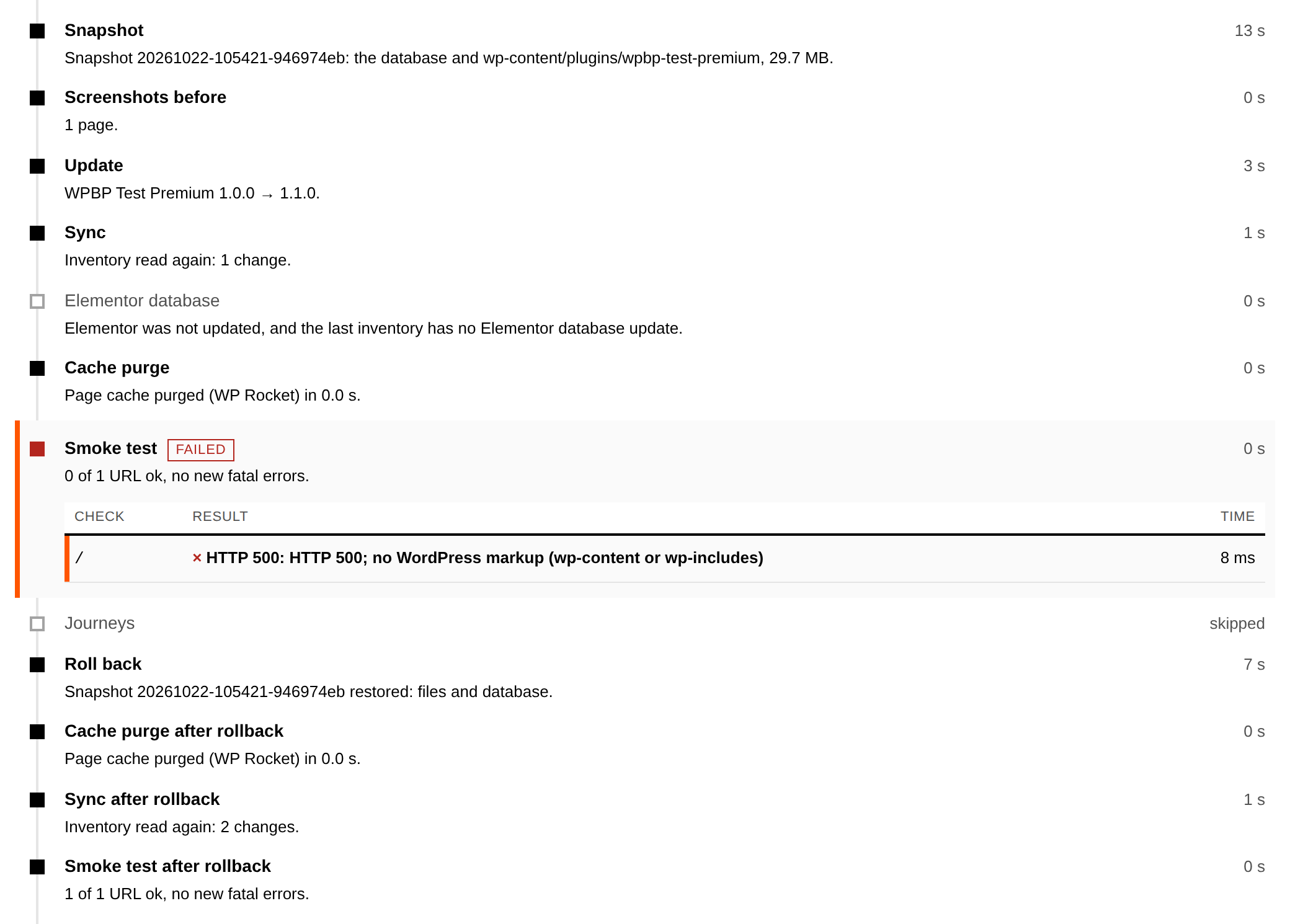
Want the exact details? Read how an update runs, step by step
Maintenance for WooCommerce online stores
When I maintain a WooCommerce online store, I do more than for a regular site. After an update, my check puts a product in the cart and opens the checkout page, without ordering anything.
When you start, I also set up a fixed route for a real browser: choose a product, add it to the cart, and fill in the checkout page. It stops at the order button, so nothing gets ordered.
That route runs after updates and, if you like, at set times too. If it fails, I get a notification. After a WooCommerce update, I first wait until the database has been updated. I update WooCommerce itself by hand.
Every half hour, I also check whether orders stay on "pending payment" for too long. That's often the first sign that a payment integration is broken. I don't change anything in your orders while doing this.
One thing to know: if an update has to be rolled back while orders have just come in, only the files go back. Your orders stay where they are.
- Online store
- only the files go back, orders stay in place
- WooCommerce update
- by hand
What I mean by maintenance
To me, maintenance means updates, backups, security, monitoring, and recovery when something goes wrong. In the market, this is also called WordPress management or, with hosting included, managed WordPress hosting.
What I do is technical management. Editing text or images isn't included by default; I do that within the 30 minutes of Pro or for €95 per hour excl. VAT. What else belongs in a good agreement? Read what belongs in a good maintenance contract.
How to get started
Intro call
A no-obligation conversation of about 20 minutes about your site, what you're running into, and whether it's a good fit.
Quick scan
I look at the technical state of your site: versions, plugins, known security holes, backups, and loading time. I go over the findings with you. Overdue maintenance that takes more than updating gets a price up front.
Migration and setup
I move your site to my server in one to three business days. It stays reachable and your email keeps working. Then I connect it to my system and turn on monitoring and backups, and for an online store, the customer steps too. Your site is usually running with me within a week.
All the sites in your package move along, and so does your email; a regular migration costs nothing extra. If it's complicated, say an online store that can't be offline for a moment, we agree up front on how to do it.
Ongoing maintenance
You hear from me when I need something from you, like a license that needs renewing. If you ask what happened, I look it up in your site's timeline.
What I need from you
- An administrator account on your WordPress site.
- Access to your current hosting account, or a full backup of your site.
- Access to the settings of your domain name (DNS), or the details of the company your domain is registered with.
- A list of your email addresses on that domain.
- The licenses for your paid plugins and your theme.
What to do with your current host
- Check how long your contract still runs and what the notice period is. Many hosts work with annual contracts.
- Cancel your old contract yourself, once your site is running with me.
- Your domain name: it can stay with your current provider, pointed at my name servers, or move to me (a .nl or .com is €19.99 per year excl. VAT).
- Your email: it moves along. Moving your existing mailboxes is something we arrange together.
More about the move itself: everything about switching
What clients say
Jorijn took over our website maintenance and resolved the technical issues that blocked incoming requests. Since then, everything runs smoothly again. He responds quickly, thinks pragmatically, and feels like a reliable partner—our IT problems are in safe hands.

I already had a website running, but my previous host was slow to respond and never really there for me. Moving my site and hosting to Jorijn should have happened much earlier. The migration was seamless with zero downtime, and he optimized everything so the site is faster and more secure. What I appreciate most is his clear, no-jargon communication and how quickly he helps when something comes up.

Jorijn is highly skilled — he delivers clean work, understands our needs and implements them exactly as discussed. He responds quickly and effectively, is technically very well versed, and is a pleasant person to work with.



Frequently asked questions about WordPress maintenance
My WordPress site hasn't been updated for a while. Is that a problem?
No. Most sites I take over are behind on updates. I clear that backlog during the migration. Does it take more than updating? Think of a site that doesn't work with newer software on the server (PHP), an expired license, or a theme that needs replacing. Then you get a price after the quick scan, before I start on it.
Do I need technical knowledge?
No. I take care of the technical side. If you want to look at your email or files yourself, you can log in to your hosting account (cPanel). But you don't have to. Most clients never log in.
What happens if an update breaks something?
Before an update, I make a copy of what's about to change. If the update or the check afterward fails, a fixed rule puts that copy back automatically. On an online store where orders came in during that time, only the files go back. If you notice something wrong later, I put back the copy from before the update; I keep it for seven days. After that, it can still come from the daily backups, going back up to six months, every day for the first two weeks. Recovery after an update through my system costs you nothing extra.
More about what happens when an update goes wrong.
Do you test updates on a test copy (staging) first?
No, not by default. The safety net is the copy beforehand, the automatic check afterward, and putting the copy back if something goes wrong. So for regular updates, a test copy isn't needed. For a really big update, I do make one first.
Why do you wait three days with a new plugin version?
If a new version is withdrawn in those first days, your site won't have received it automatically. Not everything waits, by the way. A security update for a hole that's being actively exploited doesn't wait that long. And minor updates of WordPress itself don't wait either.
Do you also maintain WooCommerce online stores?
Yes. After an update, my check puts a product in the cart and opens the checkout page. A real browser walks through a customer's steps up to the order button, and stops there. After a WooCommerce update, I wait until the database has been updated. I update WooCommerce itself by hand. Every half hour, I check whether orders are getting stuck. If an update has to be rolled back while orders have just come in, only the files go back and the orders stay in place.
What does it cost, and what if I need extra work?
Basic costs €39, Plus €59, and Pro €89 per month excl. VAT, with hosting included. Work outside the package costs €95 per hour excl. VAT, billed per quarter hour. Pro includes 30 minutes every month for small changes, like a piece of text, an image, or a menu item. What you don't use carries over one month. A short technical question is always included.
My hosting costs €5 a month now. Why would I pay €39?
For a few euros a month, you get space on a server. Sometimes there's a button or setting for automatic updates. Of the cheap hosting packages I compared, one describes an automatic check after an update that can roll it back. That check only looks at screenshots. None of those packages describes a person who steps in.
If you want maintenance by a person, you usually pay €44 to €65 per month on top of that elsewhere, for one site; budget packages with a monthly round of updates start at around €12.50. Also watch the price after the first period: many low hosting prices only apply for the first year or the first few months. A typical small package then costs €9.99 per month excl. VAT. Compared with Basic, the difference is then about €29 per month. That's what covers the maintenance.
If your site is a hobby that doesn't need to bring anything in, cheap hosting is fine. You'll find the amounts per provider, with sources, in my guide, in the section on cheap hosting or hosting with maintenance.
Can my site stay with my current hosting provider?
No. Hosting is part of the package, because I can only take responsibility for updates, security, and recovery if I also manage the server. You don't pay for it separately.
I have email on my domain. Will that keep working?
Yes. Email on your own domain is included in every package, with a spam filter and virus scanning. During the migration, I make sure your email keeps working. I'll agree with you up front on how your mailboxes move over.
What happens if I want to leave?
Your site, your database, and your content are yours. You're not locked into anything: there's no annual contract. You can cancel in any month; your package then runs until the end of the current month. You cancel through the link on your invoice, by email, or by phone.
You get a full copy of your site to take with you, files and database, at no extra cost. Your email and your domain name are arranged together with your new provider: I also supply a copy of your mail, and you or your new provider point the domain name at the new server. My connection on your site and its key I remove myself; you don't need to do anything for that.
What if you're ill or on holiday?
My management system keeps working when I'm not around. Every five minutes, it checks that your site is reachable, new security holes in your plugins are matched against your versions, the error log is read every half hour, and the daily backups keep running. With Plus and Pro, the shielding of known security holes stays active. Small updates also go ahead at night, with a copy beforehand, a check afterward, and the copy put back automatically if something goes wrong. In that case, my system also schedules security updates for holes that are being actively exploited, without waiting for me.
I do big updates and every WooCommerce update by hand, so those wait. If there's a serious security hole that has no update yet, I'll only discuss with you what to do once I'm back. An alarm goes to my phone.
For urgent matters, I've arranged a stand-in who can step in when needed. Questions and regular changes can then take longer. If you want to get at your files and backups yourself, you get access to cPanel.
What do I need to do or arrange myself?
Not much, but a few things stay with you. You pay for and renew the licenses for paid plugins and your theme; I update them. If a license has expired, I can't, and I'll raise it with you. Installing or updating plugins: you can do it yourself or leave it to me, whichever you prefer. If you do it yourself, my system doesn't make a copy beforehand and doesn't check that change.
The content of your site (text, photos, pages) stays your work. If you want me to change something, that falls under the 30 minutes a month in Pro or my rate of €95 per hour excl. VAT. And when you start, you give me access to your site, your hosting, and your domain name. You'll find the full list in what I need from you to switch.
Don't see your question? Have a look at more questions and answers
Looking at your site together
Still not sure which package suits your site? Book an intro call and I'll look at it with you.